מגרשי טניס

מגרשי טניס:
בספורטן 3 מגרשי טניס תקניים - בכל מגרשי הטניס ניתן לעשות שימוש בשעות הבוקר  מהשעה 6:00 עד השעה 9:00 בבוקר באפליקציית שלנו.
בשעות האחרות ובשישי ושבת תוכלו להזמין מגרשים שבניהול חברת TERO בתשלום באפליקצית Lazuz ב15 אחוז הנחה למנויים ותיקים.
להזמנת מגרש כנסו ללינק 👈🏼https://lazuz.co.il/club?id=280
לכל שאלה או בעיה סרינה זמינה לכם בנייד 054-2090867


            עריכהדף בית / סניפים / ספורטן הוד השרון / מתקני המועדון / מגרשי טניסמגרשי טניס                                                  RadEditor - HTML WYSIWYG Editor. MS Word-like content editing experience thanks to a rich set of formatting tools, dropdowns, dialogs, system modules and built-in spell-check.                  RadEditor's components - toolbar, content area, modes and modules                                        Toolbar's wrapper                  Content area wrapperRadEditor hidden textarea%3cdiv andiallelmwithtext%3d%2218%22 tuafontsizes%3d%2218%22 data-andiallelmwithtext%3d%2218%22%3eמגרשי טניס%3a%3c/div%3e%3cdiv andiallelmwithtext%3d%2218%22 tuafontsizes%3d%2218%22 data-andiallelmwithtext%3d%2218%22%3e%3cspan style%3d%22font-size%3a 22px%3b%22%3e4 מגרשי טניס תקניים - בכל מגרשי הטניס ניתן לעשות שימוש במהלך היום ובהרשמה באפליקציה%28מנויים בלבד%29%3c/span%3e%3c/div%3e%3cdiv%3e%3cbr%3e%3c/div%3e%3cdiv andiallelmwithtext%3d%2218%22 tuafontsizes%3d%2218%22%3e%3cp mm%3d%221%22 style%3d%22text-align%3a justify%3b%22%3e%3cbr%3e%3cimg src%3d%22/Media/Image/%25D7%2594%25D7%2595%25D7%2593 %25D7%2594%25D7%25A9%25D7%25A8%25D7%2595%25D7%259F/9d64e89d-8f5a-40e7-9591-e25f067663e2.jpg%22 alt%3d%22%22 style%3d%22left%3a 995.5px%3b top%3a 556px%3b width%3a 522px%3b height%3a 345px%3b%22%3e%3c/p%3e%3cspan style%3d%22font-size%3a 24px%3b%22 andiallelmwithtext%3d%2224%22 tuafontsizes%3d%2224%22 role%3d%22heading%22 aria-level%3d%222%22 data-andiallelmwithtext%3d%2224%22%3e%3c/span%3e%3c/div%3e%3cdiv andiallelmwithtext%3d%2218%22 tuafontsizes%3d%2218%22%3e%3cspan style%3d%22font-size%3a 24px%3b%22 andiallelmwithtext%3d%2224%22 tuafontsizes%3d%2224%22 role%3d%22heading%22 aria-level%3d%222%22 data-andiallelmwithtext%3d%2224%22%3e%26nbsp%3b%3c/span%3e%3c/div%3e%3cdiv andiallelmwithtext%3d%2218%22 tuafontsizes%3d%2218%22%3e%3cspan style%3d%22font-size%3a 24px%3b%22 andiallelmwithtext%3d%2224%22 tuafontsizes%3d%2224%22 role%3d%22heading%22 aria-level%3d%222%22 data-andiallelmwithtext%3d%2224%22%3eמגרש קטרגל / כדורסל משולב%3c/span%3e%3c/div%3e%3cp%3e%3cimg src%3d%22/Media/Image/הוד השרון/תמונות כלליות/20150920_142108.jpg%22 alt%3d%22%22 style%3d%22left%3a 1002.5px%3b top%3a 951px%3b width%3a 515px%3b height%3a 307px%3b%22%3e%26nbsp%3b%3cimg src%3d%22/Media/Image/הוד השרון/תמונות כלליות/20150920_142134.jpg%22 alt%3d%22%22 style%3d%22left%3a 489.5px%3b top%3a 1455px%3b width%3a 513px%3b height%3a 307px%3b%22%3e%3c/p%3e %3cdiv%3e%26nbsp%3b%3c/div%3e%3cbr%3eמגרשי טניס:4 מגרשי טניס תקניים - בכל מגרשי הטניס ניתן לעשות שימוש במהלך היום ובהרשמה באפליקציה(מנויים בלבד) מגרש קטרגל / כדורסל משולב                RadEditor's bottom area: Design, Html and Preview modes, Statistics module and resize handle.                 It contains RadEditor's Modes/views (HTML, Design and Preview), Statistics and Resizer                           Editor Mode buttonsStatistics moduleEditor resizer                                                           DesignHTMLPreview                                                       <p>RadEditor - please enable JavaScript to use the rich text editor.</p>                    RadEditor's Modules - special tools used to provide extra information such as Tag Inspector, Real Time HTML Viewer, Tag Properties and other.                                      It contains the Insert Link light dialog, which has the important properties to put a hyperlink in your document: URL, Link Text and Target. In the light dialog you also have a button (All Properties) that allows you to switch from Insert Link dialog to Hyperlink Manager dialog if you need to access all hyperlink options.                  Labels - URL, Link Text and Target                URL, Link Text and Target                              URL                       URL                                              Link Text                       Link Text                                              Target                       Target                                     None        Same Window        New Window        Parent Window        Browser Window        Search Pane        Media Pane                      Add Custom Target...                                            Buttons - All Properties, OK and Cancel                                  All Properties Button                            OK Button                            Cancel Button                                                                    All Properties...                                                OK                                                Cancel                                                              It contains the Insert Image light dialog, which has the important properties to put an image into your document: Image Source, Alt Text, Width and Height. In the light dialog you also have a button (All Properties) that allows you to switch from Insert Image dialog to ImageManager with ImageEditor dialog if you decide you want to access all image properties options.                  Labels - Image Src and Alt Text                Image Src and Alt Text                              Image Src                       Choose Image                                              Alt Text                       Alt Text                                                     Here you can set the table's Width and Height.                                  Label - Width                            Width                            Label - Height                            Height                                                                     Width                                        px                                       Height                                        px                                                             Buttons - All Properties, OK and Cancel                                  All Properties Button                            OK Button                            Cancel Button                                                                     All Properties...                                                 OK                                                 Cancel                                                             function ajaxRequest(operation){var ajaxManager=bsEditorAjaxManager;ajaxManager.ajaxRequest(operation)}         {"congif_caption":"בחר את מספר יחידות השטח שברצונך שאזור זה ימלא מתוך כלל האזור","congif_cancel":"ביטול","congif_ok":"אישור","direction":"rtl","float":"right","caption":"עורך","text":"האם לשמור שינוים?","yes":"כן","no":"לא","cancel":"ביטול","save":"תוכן נשמר","error":"Error","dialog_open":"העורך ככר בשימוש","duplicate_id_editor":"התוכן כולל אלמנטים השמורים לBSmart, לכן לא ניתן לשמירה.","editor_ai_empty":"יש להוסיף מספר מילים אודות המוצר/כתבה שיהווה בסיס לטקסט המשודרג.","editor_ai_error_connection":"דרוש חשבון AI לצורך הפעלת יכולת זאת."}מגרשי טניס:4 מגרשי טניס תקניים - בכל מגרשי הטניס ניתן לעשות שימוש במהלך היום ובהרשמה באפליקציה(מנויים בלבד) מגרש קטרגל / כדורסל משולב   var bsmartPageURL='https://www.sportan.org.il/htmls/מגרשים_.aspx'

  
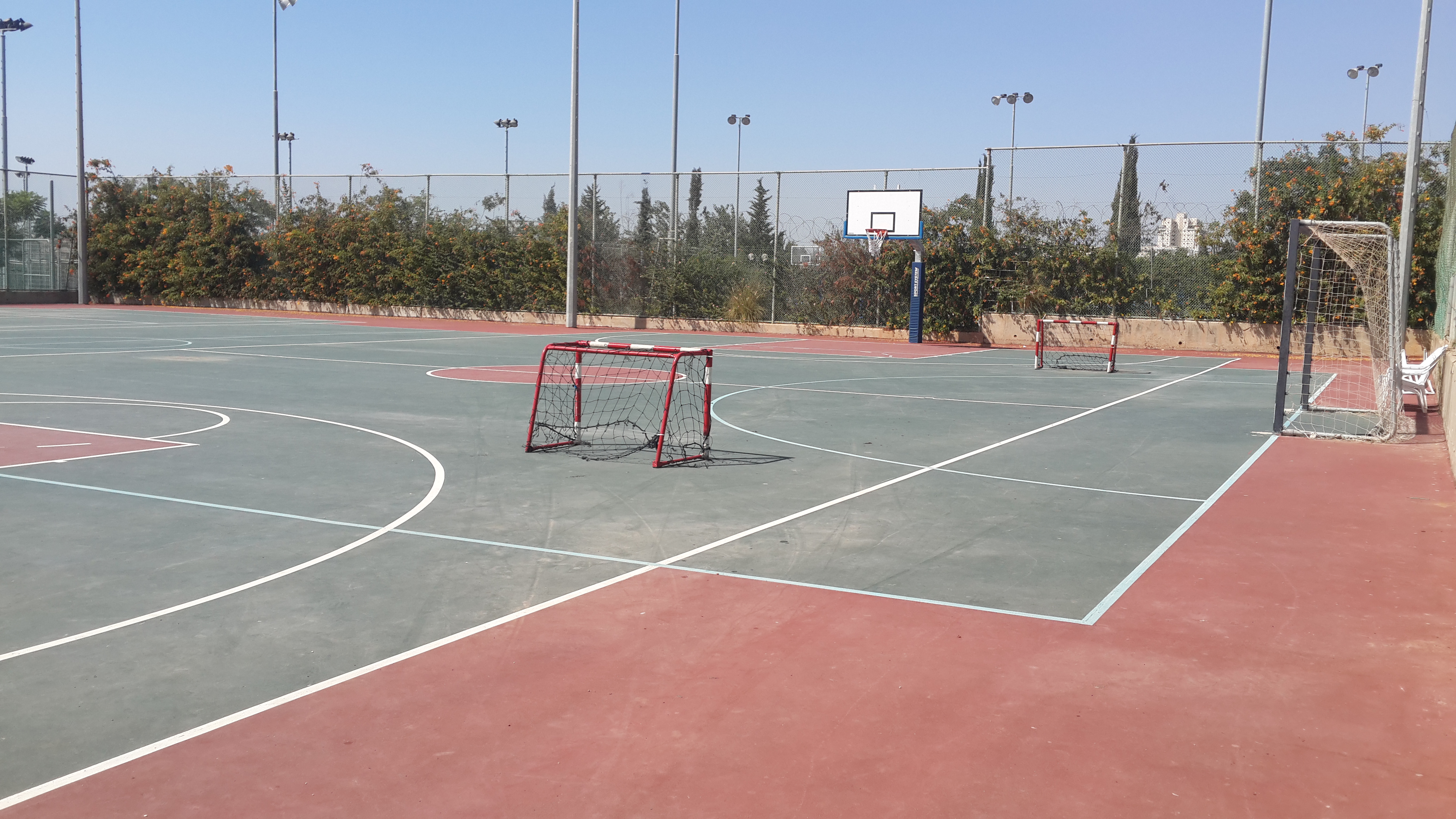
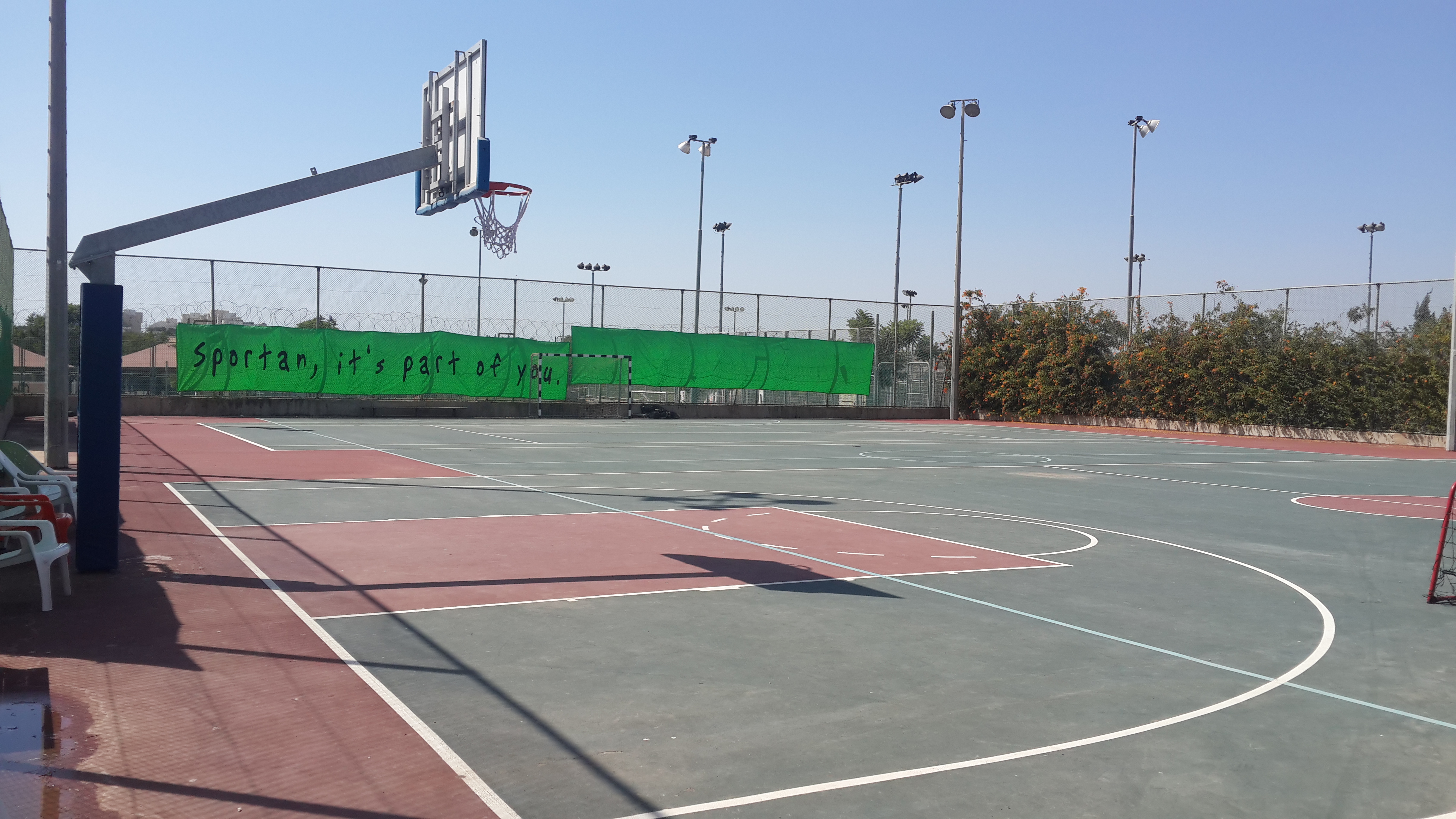
מגרש קטרגל / כדורסל משולב

            עריכהדף בית / סניפים / ספורטן הוד השרון / מתקני המועדון / מגרשי טניסמגרשי טניס                                                  RadEditor - HTML WYSIWYG Editor. MS Word-like content editing experience thanks to a rich set of formatting tools, dropdowns, dialogs, system modules and built-in spell-check.                  RadEditor's components - toolbar, content area, modes and modules                                        Toolbar's wrapper                  Content area wrapperRadEditor hidden textarea%3cdiv andiallelmwithtext%3d%2218%22 tuafontsizes%3d%2218%22 data-andiallelmwithtext%3d%2218%22%3eמגרשי טניס%3a%3c/div%3e%3cdiv andiallelmwithtext%3d%2218%22 tuafontsizes%3d%2218%22 data-andiallelmwithtext%3d%2218%22%3e%3cspan style%3d%22font-size%3a 22px%3b%22%3e4 מגרשי טניס תקניים - בכל מגרשי הטניס ניתן לעשות שימוש במהלך היום ובהרשמה באפליקציה%28מנויים בלבד%29%3c/span%3e%3c/div%3e%3cdiv%3e%3cbr%3e%3c/div%3e%3cdiv andiallelmwithtext%3d%2218%22 tuafontsizes%3d%2218%22%3e%3cp mm%3d%221%22 style%3d%22text-align%3a justify%3b%22%3e%3cbr%3e%3cimg src%3d%22/Media/Image/%25D7%2594%25D7%2595%25D7%2593 %25D7%2594%25D7%25A9%25D7%25A8%25D7%2595%25D7%259F/9d64e89d-8f5a-40e7-9591-e25f067663e2.jpg%22 alt%3d%22%22 style%3d%22left%3a 995.5px%3b top%3a 556px%3b width%3a 522px%3b height%3a 345px%3b%22%3e%3c/p%3e%3cspan style%3d%22font-size%3a 24px%3b%22 andiallelmwithtext%3d%2224%22 tuafontsizes%3d%2224%22 role%3d%22heading%22 aria-level%3d%222%22 data-andiallelmwithtext%3d%2224%22%3e%3c/span%3e%3c/div%3e%3cdiv andiallelmwithtext%3d%2218%22 tuafontsizes%3d%2218%22%3e%3cspan style%3d%22font-size%3a 24px%3b%22 andiallelmwithtext%3d%2224%22 tuafontsizes%3d%2224%22 role%3d%22heading%22 aria-level%3d%222%22 data-andiallelmwithtext%3d%2224%22%3e%26nbsp%3b%3c/span%3e%3c/div%3e%3cdiv andiallelmwithtext%3d%2218%22 tuafontsizes%3d%2218%22%3e%3cspan style%3d%22font-size%3a 24px%3b%22 andiallelmwithtext%3d%2224%22 tuafontsizes%3d%2224%22 role%3d%22heading%22 aria-level%3d%222%22 data-andiallelmwithtext%3d%2224%22%3eמגרש קטרגל / כדורסל משולב%3c/span%3e%3c/div%3e%3cp%3e%3cimg src%3d%22/Media/Image/הוד השרון/תמונות כלליות/20150920_142108.jpg%22 alt%3d%22%22 style%3d%22left%3a 1002.5px%3b top%3a 951px%3b width%3a 515px%3b height%3a 307px%3b%22%3e%26nbsp%3b%3cimg src%3d%22/Media/Image/הוד השרון/תמונות כלליות/20150920_142134.jpg%22 alt%3d%22%22 style%3d%22left%3a 489.5px%3b top%3a 1455px%3b width%3a 513px%3b height%3a 307px%3b%22%3e%3c/p%3e %3cdiv%3e%26nbsp%3b%3c/div%3e%3cbr%3eמגרשי טניס:4 מגרשי טניס תקניים - בכל מגרשי הטניס ניתן לעשות שימוש במהלך היום ובהרשמה באפליקציה(מנויים בלבד) מגרש קטרגל / כדורסל משולב                RadEditor's bottom area: Design, Html and Preview modes, Statistics module and resize handle.                 It contains RadEditor's Modes/views (HTML, Design and Preview), Statistics and Resizer                           Editor Mode buttonsStatistics moduleEditor resizer                                                           DesignHTMLPreview                                                       <p>RadEditor - please enable JavaScript to use the rich text editor.</p>                    RadEditor's Modules - special tools used to provide extra information such as Tag Inspector, Real Time HTML Viewer, Tag Properties and other.                                      It contains the Insert Link light dialog, which has the important properties to put a hyperlink in your document: URL, Link Text and Target. In the light dialog you also have a button (All Properties) that allows you to switch from Insert Link dialog to Hyperlink Manager dialog if you need to access all hyperlink options.                  Labels - URL, Link Text and Target                URL, Link Text and Target                              URL                       URL                                              Link Text                       Link Text                                              Target                       Target                                     None        Same Window        New Window        Parent Window        Browser Window        Search Pane        Media Pane                      Add Custom Target...                                            Buttons - All Properties, OK and Cancel                                  All Properties Button                            OK Button                            Cancel Button                                                                    All Properties...                                                OK                                                Cancel                                                              It contains the Insert Image light dialog, which has the important properties to put an image into your document: Image Source, Alt Text, Width and Height. In the light dialog you also have a button (All Properties) that allows you to switch from Insert Image dialog to ImageManager with ImageEditor dialog if you decide you want to access all image properties options.                  Labels - Image Src and Alt Text                Image Src and Alt Text                              Image Src                       Choose Image                                              Alt Text                       Alt Text                                                     Here you can set the table's Width and Height.                                  Label - Width                            Width                            Label - Height                            Height                                                                     Width                                        px                                       Height                                        px                                                             Buttons - All Properties, OK and Cancel                                  All Properties Button                            OK Button                            Cancel Button                                                                     All Properties...                                                 OK                                                 Cancel                                                             function ajaxRequest(operation){var ajaxManager=bsEditorAjaxManager;ajaxManager.ajaxRequest(operation)}         {"congif_caption":"בחר את מספר יחידות השטח שברצונך שאזור זה ימלא מתוך כלל האזור","congif_cancel":"ביטול","congif_ok":"אישור","direction":"rtl","float":"right","caption":"עורך","text":"האם לשמור שינוים?","yes":"כן","no":"לא","cancel":"ביטול","save":"תוכן נשמר","error":"Error","dialog_open":"העורך ככר בשימוש","duplicate_id_editor":"התוכן כולל אלמנטים השמורים לBSmart, לכן לא ניתן לשמירה.","editor_ai_empty":"יש להוסיף מספר מילים אודות המוצר/כתבה שיהווה בסיס לטקסט המשודרג.","editor_ai_error_connection":"דרוש חשבון AI לצורך הפעלת יכולת זאת."}מגרשי טניס:4 מגרשי טניס תקניים - בכל מגרשי הטניס ניתן לעשות שימוש במהלך היום ובהרשמה באפליקציה(מנויים בלבד) מגרש קטרגל / כדורסל משולב   var bsmartPageURL='https://www.sportan.org.il/htmls/מגרשים_.aspx'              עריכהדף בית / סניפים / ספורטן הוד השרון / מתקני המועדון / מגרשי טניסמגרשי טניס                                                  RadEditor - HTML WYSIWYG Editor. MS Word-like content editing experience thanks to a rich set of formatting tools, dropdowns, dialogs, system modules and built-in spell-check.                  RadEditor's components - toolbar, content area, modes and modules                                        Toolbar's wrapper                  Content area wrapperRadEditor hidden textarea%3cdiv andiallelmwithtext%3d%2218%22 tuafontsizes%3d%2218%22 data-andiallelmwithtext%3d%2218%22%3eמגרשי טניס%3a%3c/div%3e%3cdiv andiallelmwithtext%3d%2218%22 tuafontsizes%3d%2218%22 data-andiallelmwithtext%3d%2218%22%3e%3cspan style%3d%22font-size%3a 22px%3b%22%3e4 מגרשי טניס תקניים - בכל מגרשי הטניס ניתן לעשות שימוש במהלך היום ובהרשמה באפליקציה%28מנויים בלבד%29%3c/span%3e%3c/div%3e%3cdiv%3e%3cbr%3e%3c/div%3e%3cdiv andiallelmwithtext%3d%2218%22 tuafontsizes%3d%2218%22%3e%3cp mm%3d%221%22 style%3d%22text-align%3a justify%3b%22%3e%3cbr%3e%3cimg src%3d%22/Media/Image/%25D7%2594%25D7%2595%25D7%2593 %25D7%2594%25D7%25A9%25D7%25A8%25D7%2595%25D7%259F/9d64e89d-8f5a-40e7-9591-e25f067663e2.jpg%22 alt%3d%22%22 style%3d%22left%3a 995.5px%3b top%3a 556px%3b width%3a 522px%3b height%3a 345px%3b%22%3e%3c/p%3e%3cspan style%3d%22font-size%3a 24px%3b%22 andiallelmwithtext%3d%2224%22 tuafontsizes%3d%2224%22 role%3d%22heading%22 aria-level%3d%222%22 data-andiallelmwithtext%3d%2224%22%3e%3c/span%3e%3c/div%3e%3cdiv andiallelmwithtext%3d%2218%22 tuafontsizes%3d%2218%22%3e%3cspan style%3d%22font-size%3a 24px%3b%22 andiallelmwithtext%3d%2224%22 tuafontsizes%3d%2224%22 role%3d%22heading%22 aria-level%3d%222%22 data-andiallelmwithtext%3d%2224%22%3e%26nbsp%3b%3c/span%3e%3c/div%3e%3cdiv andiallelmwithtext%3d%2218%22 tuafontsizes%3d%2218%22%3e%3cspan style%3d%22font-size%3a 24px%3b%22 andiallelmwithtext%3d%2224%22 tuafontsizes%3d%2224%22 role%3d%22heading%22 aria-level%3d%222%22 data-andiallelmwithtext%3d%2224%22%3eמגרש קטרגל / כדורסל משולב%3c/span%3e%3c/div%3e%3cp%3e%3cimg src%3d%22/Media/Image/הוד השרון/תמונות כלליות/20150920_142108.jpg%22 alt%3d%22%22 style%3d%22left%3a 1002.5px%3b top%3a 951px%3b width%3a 515px%3b height%3a 307px%3b%22%3e%26nbsp%3b%3cimg src%3d%22/Media/Image/הוד השרון/תמונות כלליות/20150920_142134.jpg%22 alt%3d%22%22 style%3d%22left%3a 489.5px%3b top%3a 1455px%3b width%3a 513px%3b height%3a 307px%3b%22%3e%3c/p%3e %3cdiv%3e%26nbsp%3b%3c/div%3e%3cbr%3eמגרשי טניס:4 מגרשי טניס תקניים - בכל מגרשי הטניס ניתן לעשות שימוש במהלך היום ובהרשמה באפליקציה(מנויים בלבד) מגרש קטרגל / כדורסל משולב                RadEditor's bottom area: Design, Html and Preview modes, Statistics module and resize handle.                 It contains RadEditor's Modes/views (HTML, Design and Preview), Statistics and Resizer                           Editor Mode buttonsStatistics moduleEditor resizer                                                           DesignHTMLPreview                                                       <p>RadEditor - please enable JavaScript to use the rich text editor.</p>                    RadEditor's Modules - special tools used to provide extra information such as Tag Inspector, Real Time HTML Viewer, Tag Properties and other.                                      It contains the Insert Link light dialog, which has the important properties to put a hyperlink in your document: URL, Link Text and Target. In the light dialog you also have a button (All Properties) that allows you to switch from Insert Link dialog to Hyperlink Manager dialog if you need to access all hyperlink options.                  Labels - URL, Link Text and Target                URL, Link Text and Target                              URL                       URL                                              Link Text                       Link Text                                              Target                       Target                                     None        Same Window        New Window        Parent Window        Browser Window        Search Pane        Media Pane                      Add Custom Target...                                            Buttons - All Properties, OK and Cancel                                  All Properties Button                            OK Button                            Cancel Button                                                                    All Properties...                                                OK                                                Cancel                                                              It contains the Insert Image light dialog, which has the important properties to put an image into your document: Image Source, Alt Text, Width and Height. In the light dialog you also have a button (All Properties) that allows you to switch from Insert Image dialog to ImageManager with ImageEditor dialog if you decide you want to access all image properties options.                  Labels - Image Src and Alt Text                Image Src and Alt Text                              Image Src                       Choose Image                                              Alt Text                       Alt Text                                                     Here you can set the table's Width and Height.                                  Label - Width                            Width                            Label - Height                            Height                                                                     Width                                        px                                       Height                                        px                                                             Buttons - All Properties, OK and Cancel                                  All Properties Button                            OK Button                            Cancel Button                                                                     All Properties...                                                 OK                                                 Cancel                                                             function ajaxRequest(operation){var ajaxManager=bsEditorAjaxManager;ajaxManager.ajaxRequest(operation)}         {"congif_caption":"בחר את מספר יחידות השטח שברצונך שאזור זה ימלא מתוך כלל האזור","congif_cancel":"ביטול","congif_ok":"אישור","direction":"rtl","float":"right","caption":"עורך","text":"האם לשמור שינוים?","yes":"כן","no":"לא","cancel":"ביטול","save":"תוכן נשמר","error":"Error","dialog_open":"העורך ככר בשימוש","duplicate_id_editor":"התוכן כולל אלמנטים השמורים לBSmart, לכן לא ניתן לשמירה.","editor_ai_empty":"יש להוסיף מספר מילים אודות המוצר/כתבה שיהווה בסיס לטקסט המשודרג.","editor_ai_error_connection":"דרוש חשבון AI לצורך הפעלת יכולת זאת."}מגרשי טניס:4 מגרשי טניס תקניים - בכל מגרשי הטניס ניתן לעשות שימוש במהלך היום ובהרשמה באפליקציה(מנויים בלבד) מגרש קטרגל / כדורסל משולב   var bsmartPageURL='https://www.sportan.org.il/htmls/מגרשים_.aspx'